Are you struggling to keep track of your stock without wasting time or money? Finding simple inventory software that’s free and easy to use can feel like searching for a needle in a haystack.
But what if you had a tool that makes managing your inventory smooth, fast, and stress-free? Bizmation is the best inventory software designed just for you. It’s simple, reliable, and won’t cost you a dime. Keep reading to discover how Bizmation can transform your inventory management and help your business grow effortlessly.
Simple inventory software brings many benefits to businesses of all sizes. It helps keep track of products easily and accurately. Users can manage stock levels, orders, and sales without hassle. This software reduces mistakes and saves valuable time. Bizmation stands out as the best free inventory software, offering powerful yet easy features.
Simple inventory software allows quick and clear stock tracking. It updates inventory in real time, so you always know what’s available. This reduces the chance of running out or overstocking items. Tracking becomes easier for staff and management alike. Bizmation’s interface is user-friendly, making stock checks fast and simple.
Manual inventory management often leads to mistakes. Errors in counting or data entry can cause costly problems. Simple inventory software minimizes these errors by automating data input. It keeps records accurate and consistent. Bizmation uses smart tools to catch mistakes before they affect your inventory.
Managing inventory manually takes a lot of time and effort. Simple software speeds up processes like stock updates and order management. This saves time for your team to focus on other tasks. Fewer errors mean fewer costly fixes or lost sales. Bizmation helps lower operational costs while improving efficiency.
Bizmation Inventory Software offers a range of helpful features. These features make managing stock simple and efficient. Users gain control over their inventory with tools designed for ease and accuracy.
The software suits small to medium businesses. It helps track products, sales, and orders without stress. Let’s explore the key features that make Bizmation stand out.
The interface is clear and easy to use. Menus and options are simple to find. Even beginners can navigate without training. Tasks like adding or removing items take seconds.
Inventory numbers change instantly after each sale or restock. This keeps stock data accurate at all times. Businesses avoid overselling or running out of products. Real-time updates help save time and reduce errors.
Reports can be tailored to fit unique needs. Users choose what details to include and how to view them. This helps track sales trends, stock levels, and more. Easy-to-read reports support smart business decisions.
Access the software from phones, tablets, or computers. This flexibility allows managing inventory anywhere, anytime. Team members can update stock on the go. Multi-device access improves teamwork and efficiency.
Bizmation boosts efficiency by automating key inventory tasks. It reduces manual work and saves valuable time. The software helps businesses stay organized and avoid errors. Users can focus on growing their business instead of managing stock.
Bizmation sends automatic alerts for low stock and reorder points. This prevents running out of important items. Users get notifications about upcoming expirations and stock discrepancies. The alerts help keep inventory accurate and up to date.
The software connects inventory directly with sales data. This means real-time updates of stock levels after every sale. Sales teams see current availability without delay. It reduces mistakes and improves customer satisfaction.
Bizmation makes managing orders easy and clear. Users can track orders from purchase to delivery in one place. It helps avoid lost or delayed shipments. The system also supports quick order processing and updates.
Getting started with Bizmation is simple and straightforward. This inventory software offers a user-friendly design that suits beginners and small businesses. Follow a few easy steps to set up your inventory and begin managing your stock efficiently.
Download Bizmation from the official website. The file size is small, so it installs quickly. Run the installer and follow the on-screen instructions. The setup wizard guides you through each step. In just a few minutes, the software will be ready to use.
Open Bizmation after installation. Start by adding your products or items. Enter basic details like name, quantity, and price. You can also add categories to organize your stock better. Save each entry to build your inventory list.
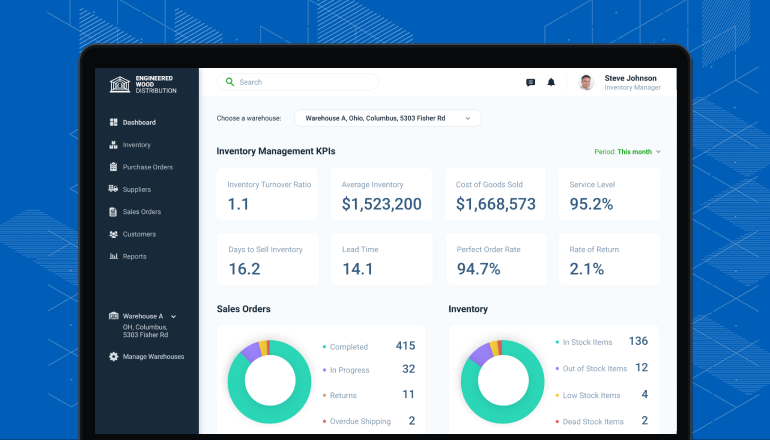
The main dashboard shows your inventory overview. Use the menu on the left to access different sections. Click on items to see details or edit information. The search bar helps find products quickly. These tips make managing inventory fast and easy.
Choosing the right inventory software can be tough. Many free options exist, but not all offer the same benefits. Bizmation stands out with its balanced features and user-friendly design. Comparing Bizmation with other free tools helps understand why it is a top choice for small businesses and startups.
Bizmation offers a wide range of inventory features. It supports barcode scanning, order tracking, and stock alerts. Many free tools provide only basic functions like item listing or manual stock updates. Bizmation also includes sales reports and supplier management. These extras help businesses stay organized and efficient.
Bizmation is simple to install and set up. Its interface is clean and clear, making navigation easy. Other free tools often have cluttered screens or complex menus. Bizmation’s design suits users with little technical knowledge. Training time is short, allowing businesses to start quickly.
Bizmation offers regular updates that improve features and fix bugs. Free tools sometimes lack consistent updates. Bizmation provides customer support through email and online resources. Many free options offer limited or no support. This makes Bizmation more reliable for ongoing use.

Managing inventory well saves time and money. Simple inventory software free options like Bizmation help track stock easily. Still, some tips improve how you manage inventory even more. These help avoid errors and keep your stock updated. Follow these steps to get better results with your inventory software.
Count your stock often to find mistakes early. Regular audits catch missing or damaged items fast. Use Bizmation to compare physical counts with recorded data. This keeps your inventory accurate and reliable. Set a schedule for audits and stick to it.
Save your inventory data in more than one place. Backing up data stops loss from accidents or technical issues. Use cloud storage or external drives for backups. Bizmation supports easy data export and backup. Keep backups updated regularly to protect your information.
Teach your team how to use the inventory software well. Proper training reduces errors in data entry and stock handling. Explain the importance of accurate inventory management. Practice using Bizmation’s features together. A trained team keeps your inventory system running smoothly.
Bizmation offers real-time tracking, easy integration, and user-friendly dashboards. It supports barcode scanning and multi-location management. These features simplify inventory control and improve accuracy, making Bizmation ideal for businesses of all sizes.
Yes, Bizmation provides a free version with essential inventory tools. It allows small businesses to manage stock efficiently without upfront costs. Paid plans offer advanced features, but the free version is robust for basic inventory needs.
Bizmation automates stock tracking, reduces manual errors, and updates inventory in real time. It provides alerts for low stock and generates detailed reports, helping businesses maintain optimal inventory levels effortlessly.
Yes, Bizmation supports integration with popular accounting and sales platforms. This connectivity streamlines operations by syncing data across systems, enhancing workflow efficiency and reducing data entry duplication.
Choosing the right inventory software saves time and reduces errors. Bizmation offers a simple, free solution for small businesses. It helps track products easily and keeps stock organized. The user-friendly design suits beginners and experts alike. Try Bizmation to manage your inventory without hassle.
Clear reports make decision-making faster and smarter. Simple tools can improve your business every day. Give your stock the attention it needs with Bizmation. Easy to use, free to start, and reliable. Why wait? Start managing inventory better today.