Managing your orders can be tricky, especially when you’re juggling inventory, shipments, and customer demands. What if you had a tool that makes all of this simple and free?
That’s where order management software comes in—and Bizmation stands out as the best choice for your inventory needs. Imagine saving time, avoiding mistakes, and keeping your customers happy without extra cost. Curious how Bizmation can transform your business? Keep reading to discover why this free software could be exactly what you need.
Free order management software offers many advantages for small and growing businesses. It helps manage sales, orders, and inventory without extra costs. This type of software simplifies daily tasks and helps reduce mistakes. Using free tools like Bizmation, the best inventory software, can improve your business operations easily.
Small businesses often have tight budgets. Free order management software saves money on expensive licenses. It reduces the need to hire extra staff for order tracking. Businesses can use saved funds for other important needs. No monthly fees mean better control of expenses.
Order management software speeds up order handling. It automates steps like order entry and status updates. This reduces manual work and errors. Faster processing leads to happy customers and repeat sales. The software helps keep orders organized and easy to track.
Accurate inventory counts prevent stockouts and overstocking. Free software tracks inventory in real time. It alerts users when stock is low or needs reordering. This accuracy saves money and avoids lost sales. Better inventory control supports smooth business operations.
Bizmation Inventory Software offers essential features that simplify order management. It helps businesses keep track of stock and orders easily. The software improves accuracy and saves time. Each feature supports smooth inventory control and order processing.
Bizmation tracks inventory levels instantly. It updates stock quantities as sales or deliveries happen. This feature prevents stockouts and overstock issues. Users can see accurate inventory data anytime. It helps make better purchasing decisions fast.
The software automates the entire order process. Orders are processed without manual input. It reduces errors and speeds up delivery times. Automation ensures customers get their orders on time. It also manages backorders and shipment notifications efficiently.
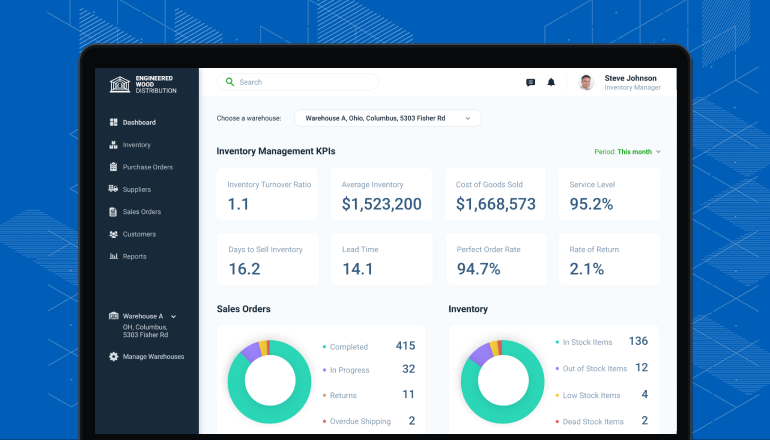
Bizmation has a simple and clear design. Users can navigate the software without training. The dashboard shows all important information at a glance. It supports quick order entry and inventory updates. This interface saves time and reduces mistakes.
Bizmation improves how businesses handle orders and inventory. It makes processes smooth and less time-consuming. This helps teams work faster and with fewer mistakes. The software fits well in many business types, making order management simple and clear.
Manual work often causes mistakes in orders and stock counts. Bizmation cuts down these errors by automating tasks. It checks data automatically, so wrong entries become rare. This saves time spent fixing errors later. Accurate data means better decisions and happy customers.
Speed is key in order management. Bizmation speeds up order processing from start to finish. It tracks each step and alerts teams about delays. Quick updates help staff act fast and keep orders moving. Faster orders lead to satisfied customers and repeat business.
Bizmation offers built-in reports that show real-time data. These reports help understand sales, stock levels, and order status. Easy-to-read charts and tables make insights clear. Teams use this information to plan and improve operations. Good reports lead to smarter business moves.

Choosing the right order management software can be tough. Many free options promise basic features but fall short in important areas. Bizmation stands out by offering a strong balance of tools and ease. This section compares Bizmation with other free solutions to show why it is a top choice.
Bizmation offers a wide range of features for inventory and order tracking. It includes real-time updates, barcode scanning, and sales reports. Many free alternatives have limited tools and miss crucial functions like multi-location support. Bizmation covers essential needs for small to medium businesses without extra costs. Users get more control and insight into their stock and orders.
Bizmation has a clean and simple interface. New users can learn it quickly without technical help. Other free software often has complicated menus and slow response times. Bizmation’s design focuses on speed and clarity. This helps save time and reduces errors during order processing. The software works well on desktop and mobile devices, adding convenience.
Bizmation provides reliable customer support even for free users. Help is available through email, chat, and tutorials. Many free tools offer little or no support, leaving users stuck. Bizmation’s team responds quickly to questions and solves problems. This support builds confidence and ensures smooth operation for businesses.
Starting with Bizmation is simple and quick. This order management software helps organize your inventory and sales. Follow a few clear steps to set up Bizmation for your business. Each step ensures smooth operation and easy tracking of your stock.
Begin by visiting the Bizmation website. Create an account using your email and a strong password. Fill in basic business details to personalize your profile. Verify your email to activate the account. This step secures your access and prepares your dashboard.
Next, add your products into the system. Enter item names, descriptions, and quantities. Upload images for easy identification. Set prices and supplier information for each product. Organize items by categories to find them faster later.
Explore Bizmation’s training materials to learn its features. Watch tutorial videos or read step-by-step guides. Join webinars for live demonstrations and tips. Contact customer support for help with any issues. Support is available to assist you anytime.
Maximizing the benefits of order management software like Bizmation is essential for smooth business operations. Using the software effectively saves time and reduces errors. Small efforts in setting up and maintaining the system can lead to big improvements in inventory control and order processing.
Below are some practical tips to get the most out of your order management software.
Keep your inventory data fresh and accurate. Update stock levels every day to avoid mistakes. Accurate data helps prevent overselling or running out of products. Regular updates ensure your reports reflect the true status of your inventory.
Adjust the software settings to fit your business process. Tailor order steps and notifications to suit your team’s needs. A customized workflow reduces confusion and speeds up order handling. Clear steps help employees follow the right process easily.
Use the software’s reports to understand sales trends and stock movement. Analytics help identify best-selling products and slow movers. This knowledge supports smarter purchasing and marketing decisions. Regular review of analytics improves overall business planning.
Order management software streamlines sales, inventory, and shipping processes. It improves accuracy, efficiency, and customer satisfaction. Bizmation offers a free, user-friendly solution ideal for businesses of all sizes to manage orders seamlessly and reduce operational errors.
Bizmation provides comprehensive inventory control with real-time tracking and automated updates. It is free, easy to use, and integrates with sales channels. This software helps reduce stockouts and overstock, improving business profitability and operational efficiency.
Bizmation minimizes human errors by automating order entry and validation. It synchronizes inventory data across platforms and sends instant alerts for discrepancies. This ensures accurate order fulfillment, reducing returns and enhancing customer trust.
Yes, Bizmation is designed for small to medium businesses. It offers essential features without complex setups or high costs. The free version supports growth by simplifying order and inventory management effectively.
Choosing the right order management software saves time and reduces errors. Bizmation offers simple tools for tracking inventory and orders. It helps small and large businesses stay organized every day. Free options like Bizmation let you try features without risk.
Managing stock and sales becomes easier with this software. Good order management keeps customers happy and business smooth. Try Bizmation to see how it fits your needs. Simple, clear, and effective—tools anyone can use. A smart choice for better inventory control and order tracking.