
E-commerce in Bangladesh has seen rapid growth over the last decade. More people now shop online, and more businesses are starting digital stores. But as your business grows, so do the challenges. Processing hundreds of orders, managing inventory, handling marketing, and making sure each order is shipped on time can quickly become overwhelming. This is where e-commerce automation comes in—a way to make your online business run smoothly, save time, and increase profits.
Running an automated ecommerce store means using technology to complete repetitive tasks. You don’t have to check every order, send every email, or update inventory by hand. Instead, smart tools do these jobs for you. This guide will help Bangladeshi online business owners understand how ecommerce automation can help, where to start, and how to build a business that grows easily without extra stress.
E-commerce automation uses software and tools to handle tasks that you would otherwise do manually. This can include order processing, inventory updates, sending promotional emails, or generating sales reports. Imagine your business as a machine—automation is the oil that keeps all parts running without friction.
Some common tasks you can automate are:
Order confirmation emails
Shipping updates to customers
Low stock alerts
Abandoned cart reminders
Accounting data entry
With automation, you can serve more customers with less effort. This is not just for big companies—smaller businesses in Bangladesh can automate too, often using simple, affordable tools.
But what does this look like in real life? Let’s say you run a small online clothing store. Every time someone buys a shirt, you’d usually need to check your email, update your stock, send a thank you message, and then inform your delivery partner.
If you get 10–20 orders a week, this feels manageable. But what if you get 100 orders in a day, especially during Eid or Puja sales? Manually doing every step becomes impossible. Automation means you set up rules and systems once, and the technology takes care of the rest—even if you’re busy or asleep.
Customer segmentation: Automatically group customers by what they bought, how often, or how much they spend.
Feedback requests: Send review requests after an order is delivered.
Price updates: Set rules to automatically change prices for promotions or sales events.
Supplier reordering: When stock gets low, automatically send purchase orders to your suppliers.
Automation is flexible. You can start with just one or two tasks, then add more as your store grows.
It’s important to know what automation does NOT mean. Automation does not mean you never need to check your store or talk to customers. It does not replace human creativity or judgment. Instead, it handles boring, repeated tasks so you can focus on growth, strategy, and providing great service.
Bangladeshi online business owners face unique challenges: high order volumes during festivals, frequent stockouts, and manual mistakes that can lead to unhappy customers. Automation can help solve these problems by:
Saving time: You don’t need to do everything by hand. Automated workflows do the work, so you can focus on business growth.
Reducing errors: Computers don’t get tired. They send the right email, update the right stock, or generate the right invoice every time.
Increasing profits: Automation speeds up order processing and improves customer experience, which leads to more sales.
Scalability: Your business can grow without hiring a big team. Automation tools can handle hundreds or thousands of orders just as easily as ten.
Beyond these basics, automation helps you stay competitive. In Bangladesh, online shoppers expect fast delivery and quick responses. If your store is slow to respond or makes mistakes, buyers can easily switch to a competitor. Automation helps you keep up—sometimes even beat—larger businesses.
Festival rush: During Eid, Pohela Boishakh, or end-of-season sales, order numbers can jump 3–5 times higher. Manual systems often break down or slow down.
Complex delivery needs: With many customers in remote areas, handling different couriers, tracking, and cash-on-delivery (COD) settlements is tough.
Stockouts and overselling: If your inventory isn’t updated quickly, you might sell items you don’t have. This leads to refund requests and bad reviews.
Manual reporting: Calculating daily sales, expenses, or profits by hand is slow. If you miss a mistake, it can cost you money.
Better data: Automated systems keep records of every sale, return, and message. You can analyze this data to find trends and plan smarter.
Happier staff: Your team spends less time on boring tasks and more on creative or strategic work.
24/7 operation: Automation works even when you or your staff are offline. Orders, emails, and updates continue at night or on holidays.
One common beginner mistake is to think, “It’s just a small error. ” But one missed order, one late delivery, or one forgotten email can lead to lost customers and negative reviews. Automation doesn’t get tired or distracted, so these small mistakes don’t pile up.
Let’s look at the main areas where automation makes a real difference for ecommerce businesses in Bangladesh.
Order processing is the core of any online business. When a customer clicks "Buy," several steps must happen: payment, inventory check, order confirmation, and shipping. Doing this manually is slow and risky. Order automation makes these steps fast and error-free.
Order Received: The customer buys a product.
Payment Verification: The system checks if payment is completed.
Inventory Update: Stock levels automatically decrease.
Order Confirmation: The customer receives an email or SMS.
Order Sent to Warehouse: Staff or systems prepare the item for shipping.
Shipping Label Creation: Labels are made and attached to packages.
Tracking Details Sent: The customer gets tracking information.
Every step above can run without manual work. This means you can process more orders, faster.
Suppose you get 50 orders in a day. Manually, you might spend 2 minutes on each order just to process basics—checking payment, updating stock, sending a confirmation. That’s over 1. 5 hours daily. Automation can do the same job in seconds.
With automation, when payment is confirmed, your stock updates instantly, an email is sent, and the order is queued for packing. You only need to step in if there’s a problem, like a payment issue or out-of-stock item.
On Shopify, you can set up automation so every paid order is instantly sent to your warehouse team. If a product is out of stock, the system can automatically inform the customer and update your online store. This reduces customer complaints and saves hours every week.
Shopify also allows you to use apps like Order Printer or ShipStation to create shipping labels and invoices automatically. If you use multiple couriers, Shopify can even help you choose the right delivery partner based on the customer's location.
Many Bangladeshi stores use WooCommerce on WordPress. You can install plugins like AutomateWoo or WooCommerce Order Status Manager to trigger SMS confirmations, update order status, and link with local delivery partners like Pathao or RedX.
Not setting up payment verification can lead to shipping unpaid orders. Make sure your automation checks for payment before starting shipping.
Manual order reviews slow down the process. Use fraud detection tools instead to flag suspicious orders automatically.
Forgetting to update inventory leads to overselling. Your system should always decrease stock when an order is placed and notify you when levels are low.
Failing to handle exceptions: Sometimes, automation fails due to API errors or out-of-stock situations. Always have a manual backup or alert system to catch these.
Automation is powerful, but you should regularly check your system logs and error reports. This helps you catch problems early—like failed payments or delayed orders—before they become customer complaints.
Marketing is key to attracting and keeping customers. But sending each email or running ads by hand is time-consuming. Ecommerce marketing automation uses software to handle these tasks, so you reach more people with less work.
Welcome emails: Send new customers a thank you message automatically.
Abandoned cart reminders: Remind shoppers who did not finish their purchase.
Product recommendations: Suggest items based on previous purchases.
Loyalty rewards: Give discounts to repeat customers.
Social media posts: Schedule and post updates automatically.
You can also automate:
Birthday or anniversary offers: Delight your customers with a special discount on their birthday.
Re-engagement campaigns: If a customer hasn’t shopped in three months, send them a “We miss you” coupon.
Seasonal promotions: Automatically send Eid or New Year deals to your customer list.
Customer feedback requests: After delivery, send an email or SMS asking for a review.
According to a study by Omnisend, businesses using abandoned cart automation recover about 20% of lost sales. This is money you would likely not get without automation.
Many Bangladeshi stores see a big jump in repeat sales after setting up simple email or SMS automations. For example, a beauty products store in Chattogram used automated “thank you” emails and saw a 15% increase in repeat orders within two months.
Start with email automation. Use tools like Mailchimp or Klaviyo to send emails based on customer actions. For example, when someone signs up, they get a welcome email. If they leave items in their cart, they get a reminder.
After emails, add SMS automation. Many Bangladeshi customers check their phones more often than email. Tools like SMS Alert or Twilio can send instant updates, reminders, or offers.
Choose an email tool (Mailchimp, Klaviyo, or a local SMS service).
Write a friendly reminder message.
Set the trigger: If a customer adds items to the cart but doesn’t buy within 2–4 hours, send the email or SMS.
Add a small offer (like 5% off) to encourage checkout.
Track results: See how many people return and complete their purchase.
Don’t just send the same message to everyone. Automated marketing works best when you segment customers and send relevant offers. For example, offer a discount on baby products to parents, not college students.
You can also personalize by location—send offers for winter clothes to customers in Sylhet or Chattogram when cold weather starts, not in summer. Personalization makes people feel valued and increases sales.
Many Bangladeshi stores sell through Facebook or Instagram. Messenger bots can answer questions, take orders, and send order updates automatically. Tools like ManyChat or Chatfuel make this easy.
Too many messages: If you send too many emails or SMS, customers may unsubscribe or block you. Find the right balance.
Ignoring customer replies: Automated messages are good, but some customers will reply with questions. Always monitor and respond.
Not testing campaigns: Always test your messages before sending them to everyone. Check for spelling errors, broken links, or wrong offers.
Shipping is a make-or-break part of online shopping. Customers in Bangladesh want fast delivery and clear updates. Ecommerce shipping automation connects your store to couriers and keeps customers informed, without you sending messages one by one.
Automatic courier selection: The system picks the best courier based on location or price.
Shipping label printing: Labels are created with one click.
Real-time tracking: Customers get tracking links automatically.
Returns processing: Return labels and instructions are sent out as needed.
You can also automate:
Order packing slips: Print lists of what to pack for each order.
Delivery status updates: Send SMS or email when an order is out for delivery, delivered, or delayed.
Cash-on-delivery (COD) management: Mark orders as paid when the courier collects cash.
If you sell through your own website, you can connect to RedX or Pathao’s API. When an order is placed, shipping info is sent to the courier automatically. You get tracking details, which your system sends to the customer. This means less phone calls and fewer mistakes.
Customer places an order.
Your store sends the order details to RedX or Pathao via API.
RedX/Pathao schedules pickup and generates a tracking ID.
Tracking ID is sent back to your store and then to the customer.
When the order is delivered, status updates automatically.
For COD, payment is marked as received in your system.
Some local couriers offer cash-on-delivery (COD) automation. When a parcel is delivered, the system marks the order as paid and updates your records. This is especially useful for Bangladeshi customers who prefer COD.
Many Bangladeshi customers expect to pay cash when they receive their order. Automation helps you track which orders are paid, which are pending, and which are returned. This makes bookkeeping and cash flow easier.
If you ship across Bangladesh, you might use several couriers. Automation tools can pick the fastest or cheapest courier for each order based on location, weight, or delivery speed. This saves money and improves delivery times.
Not checking courier integration before launch can cause missed deliveries. Always test with a few orders before going live.
Ignoring failed delivery notifications can create unhappy customers. Automate follow-ups for failed deliveries.
Not updating delivery status: If your system isn’t connected to the courier’s tracking, customers won’t know where their order is. This increases support calls.
Many Bangladeshi sellers ignore returns. But if you automate return requests and labels, you reduce confusion and build trust. Customers are more likely to buy if they know returns are easy.
Keeping track of sales, expenses, and profits is vital. Manual accounting is slow and risky. Ecommerce accounting automation connects your store to accounting software, so all financial records are updated in real time.
No manual data entry: Sales and expenses are recorded instantly.
Automatic invoice creation: Customers get invoices right after buying.
Tax calculations: VAT and other taxes are calculated automatically.
Financial reports: Get daily, weekly, or monthly summaries.
You can also automate:
Expense tracking: Automatically record courier charges, ad spend, or supplier payments.
Profit/loss reports: See your profit for any period with one click.
Bank reconciliation: Match your sales and expenses with your bank statements.
If you use Shopify or WooCommerce, you can connect your store to Xero or QuickBooks. Each order is automatically recorded. This makes tax time easy and cuts down on costly mistakes.
Some Bangladeshi businesses use Tally for accounting. Tools like ShopUp can export your sales data for easy upload into Tally or other accounting software.
If you sell on multiple platforms (your own site, Facebook Shop, Daraz), automation tools can merge all your sales into one place. This gives you a true picture of your business health.
Some platforms let you categorize sales by channel, so you know how much each platform earns. This helps you decide where to invest more time or money.
Not updating integration settings can lead to missing sales data. Check your automation settings regularly.
Relying only on manual checks often causes missed expenses. Let your software notify you of errors or mismatches.
Ignoring local tax rules: Automation helps, but you still need to know Bangladesh VAT and tax laws. Work with a local accountant to set up your system correctly.
Automated accounting systems keep detailed logs of every sale, refund, or expense. This is very useful during audits or when you need to check old records. Manual systems often miss these details.
Building an automated ecommerce store does not happen overnight. It is best to start step by step. Here’s how Bangladeshi business owners can approach automation:
Identify repetitive tasks: List what you do every day. Examples: sending order confirmations, updating inventory, posting on Facebook.
Pick tools for each task: Choose software that fits your platform. For example, use ShopUp for inventory, Mailchimp for emails, and Xero for accounting.
Connect your systems: Use integrations (APIs or plugins) to link your store with your tools.
Test your automation: Run test orders. Make sure emails, inventory, and shipping work smoothly.
Monitor and improve: Check reports. See where automation saves time or needs tweaking.
Spend a week writing down every repeated action. If you send the same SMS to customers, update inventory every night, or copy sales data into Excel, these are all tasks you can automate.
Not every tool fits every business. If you mostly sell on Facebook, a Messenger bot and order management tool is best. For website stores, plugins and integrations matter more. Always check if the tool works with Bangladeshi couriers, banks, and payment methods.
Suppose you run a boutique with 30 orders a day:
Use Shopify or WooCommerce for your store.
Add Mailchimp for automated emails.
Connect Pathao for shipping automation.
Use Xero for accounting.
Link everything using Zapier or native integrations.
Test with 5–10 orders. Check if all steps work. Fix any problems. Then expand.
Services like Zapier or Integromat can connect different apps together. For example, when you get a new order, Zapier can add the customer to your mailing list and send the details to your accountant.
You can also use tools like Automate. io or Make for even more advanced connections. For example, when someone leaves a review, the system can send them a thank you offer for their next purchase.
Don’t try to automate everything at once. Start with the biggest time-waster. Once it works smoothly, add another. Too much automation at once can be confusing and hard to manage.
A good workflow means orders move from customer to delivery with as little friction as possible. Automation helps you:
Reduce bottlenecks: No waiting for manual approval.
Increase speed: Customers get what they want faster.
Cut costs: Fewer staff needed for basic tasks.
Customer orders online.
Payment is verified automatically.
Order details are sent to inventory and shipping.
Inventory is updated.
Shipping label is printed.
Customer gets tracking and invoice.
Accountant receives sales record.
Every step can be automated. This is how big platforms like Amazon and Walmart operate—they use advanced automation to handle millions of orders daily.
Draw a simple flowchart of your current process. Mark which steps are manual and which are automated. Focus on automating steps that cause delays or errors.
As you grow, your workflow may need to change. For example, you may add:
Multiple warehouses: Automatically route orders to the nearest warehouse.
Bulk order processing: Process 100 orders at once instead of one by one.
Advanced customer service: Use chatbots or auto-reply for common questions.
Sometimes, automation makes one step very fast but creates a bottleneck in another. For example, fast order processing but slow packing. Always review your full workflow and adjust as you grow.
Write down your workflow and automation rules. This helps new staff learn quickly and reduces errors if someone is sick or leaves.
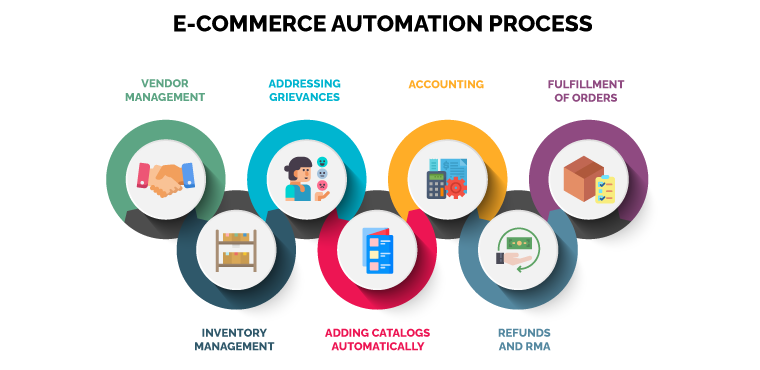
You want your business to grow, not create more work for yourself. Scalability means you can handle more sales without chaos. Here’s how automation helps:
Keep all product data in one place. Automated systems update stock levels across all sales channels. This stops overselling and keeps customers happy.
For example, if you sell on Facebook, Daraz, and your own website, one system updates stock everywhere when you sell an item. This prevents problems like selling the same piece to two people.
As you grow, you may use several warehouses. Automation can send orders to the right warehouse based on location, reducing delivery times.
For example, if an order comes from Rajshahi, it’s routed to your Rajshahi warehouse, not Dhaka. This saves time and money on shipping.
Use chatbots for common questions: “Where is my order?” or “How do I return an item?” This saves hours each week.
You can also automate FAQs, order status checks, and feedback collection. For complex questions, the bot can forward to your team.
Sell on your website, Facebook, Amazon, or Daraz. Automation tools sync inventory and orders across all platforms.
This means you never have to update each platform separately. Orders from any channel go into one system, making management easy.
Automated reports show sales trends, best sellers, and slow movers. Use this information to plan your next move.
For example, if you see that women’s kurtis sell best in winter, you can plan promotions or stock up in advance.
Automation helps you scale up during big sales events. You can process hundreds of orders per hour, send personalized offers to thousands, and update stock in real time—without hiring extra staff.
Some stores set up automation for 50 orders a day, but then struggle when sales jump to 500. Choose tools that can grow with you, or upgrade as needed.
Amazon and Walmart are global leaders in e-commerce automation. Their systems process millions of orders every day, with almost everything automated—order routing, shipping, returns, and even customer service.
Use order automation to process sales instantly.
Automate returns and refunds to build trust.
Use data automation to track trends and manage inventory.
If you sell on Amazon or Walmart’s marketplace, automation tools can update your listings, prices, and inventory. This is how many successful sellers scale up and compete internationally.
Amazon sellers can use tools to:
Automatically adjust prices to stay competitive.
Update stock levels across multiple warehouses.
Print shipping labels for FBA (Fulfillment by Amazon) orders.
Send automated emails for feedback and reviews.
Track sales, returns, and customer messages.
On Walmart, automation helps you:
Sync inventory with other sales channels.
Manage bulk listings.
Process orders and returns quickly.
Analyze sales performance and adjust strategies fast.
While Bangladesh doesn’t have a giant platform like Amazon yet, you can use similar automation tools for your own website or on local platforms like Daraz. The key is using technology to do more with less manual work.
Even Amazon and Walmart still need human managers to check reports and fix errors. Automation is a tool—not a replacement for good business sense.
Bangladeshi business owners have access to many automation tools. Some of the most useful are:
Shopify Flow: Automate tasks on Shopify stores.
Mailchimp: Marketing emails and customer segmentation.
Zapier: Connects different apps.
Xero/QuickBooks: Accounting automation.
ShopUp/GoBD: Inventory and order management for local stores.
Pathao/RedX API: Shipping automation.
Bizmation: Full-service e-commerce automation agency.
Depending on your platform, you might use:
WooCommerce plugins: Automate order status, emails, and SMS on WordPress.
ManyChat/Chatfuel: Automate Facebook Messenger for sales and support.
Google Sheets automation: Track sales and inventory in real time.
ERP systems: Full business management, from inventory to HR.
Custom APIs: For unique workflows or integration with local banks or couriers.
Business intelligence (BI) tools: For deep data analysis and reports.
Start with your biggest pain point: If shipping is slow, automate shipping first. If marketing takes too much time, start with email or SMS automation.
Check local support: Some tools work better with Bangladeshi couriers, payment gateways, or tax rules.
Test before committing: Many tools offer free trials. Try before you buy to make sure it fits your needs.
Let’s look at a real example. A fashion store in Dhaka received about 100 orders daily. Manual order processing meant slow shipping, frequent mistakes, and unhappy customers.
Added order automation: Orders went straight to the warehouse, reducing delay.
Set up marketing automation: Abandoned cart reminders increased sales by 18%.
Integrated shipping API: Tracking info sent to customers automatically.
Connected accounting tool: No more manual record-keeping.
Order automation: The store used Shopify Flow to connect their store to warehouse packing lists and courier APIs. Orders were auto-tagged by status and location.
Marketing automation: Used Mailchimp for personalized offers and SMS Alert for instant notifications.
Shipping integration: Connected with both RedX and Pathao, auto-picking the fastest courier for each order.
Accounting: Linked Shopify to Xero, so every sale and refund was recorded instantly.
Order processing time dropped from 6 hours to 30 minutes per day.
Customer complaints fell by 40%.
Monthly sales doubled in one year.
The owner also noticed that staff turnover decreased. Team members were happier because they did fewer boring tasks and had more time for customer service and creative projects.
Automation freed up time for the owner to focus on finding new suppliers, creating better product photos, and planning big promotions. Instead of working “in” the business, they started working “on” the business.
If you want an easy way to automate your ecommerce store, Bizmation (bizmation.io) is a leading solution provider in Bangladesh. They help businesses like yours run smarter and grow faster with automation.
Inventory management: Keep stock levels accurate across all platforms.
Fraud order filtering: Identify risky orders and reduce losses.
One-click landing pages: Create promotional pages quickly, no coding needed.
Order and shipping automation: From order to delivery, everything runs smoothly.
Integrated accounting: Your sales and expenses are tracked automatically.
Local courier integration: Works with Pathao, RedX, Paperfly, and others.
Multi-language support: Send messages in Bangla and English.
Analytics dashboard: See real-time sales, returns, and expenses.
Bulk product management: Update prices, stock, or descriptions for hundreds of items at once.
Local support for Bangladeshi businesses.
Works with popular platforms like Shopify, WooCommerce, and custom stores.
Helps you avoid common automation mistakes.
Scales as your business grows.
Non-obvious insight: Many business owners only automate part of their store. Bizmation helps connect ALL parts—orders, inventory, shipping, and accounting—so nothing falls through the cracks.
Bizmation also provides training and support, so your team learns how to use automation tools effectively. This reduces setup mistakes and increases long-term success.
For more information on e-commerce automation trends and best practices, check Shopify’s automation guide.
Start small, scale up: You don’t need to automate everything at once. Begin with the most time-consuming task.
Train your team: Make sure staff understand new tools. Automation works best when everyone uses it correctly.
Monitor results: Check reports to see where automation saves time or needs adjustment.
Stay updated: Technology changes fast. Review your tools every 6-12 months.
Focus on customer experience: Automation should make shopping easier, not harder, for your customers.
Data Security: With automation, your business data moves between many tools. Choose secure, trusted providers and back up your data regularly.
Mobile Optimization: Many Bangladeshi customers shop from mobile phones. Make sure automated messages and order updates look good on mobile devices.
Not all automation tools support Bangla. If your customers prefer Bangla SMS or emails, choose tools or service providers that offer this feature for better engagement.
Even with automation, always read customer reviews and feedback. Automated systems may miss small problems that matter to your customers. Use feedback to improve your automation rules.
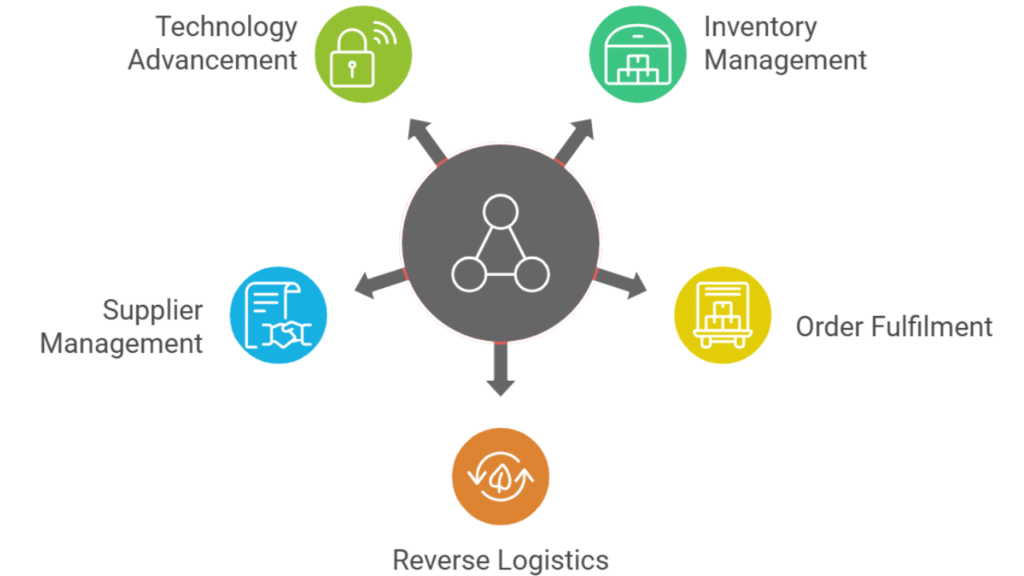
E-commerce automation is the use of software and tools to complete tasks in your online business automatically. This includes order processing, inventory updates, sending emails, and accounting, so you don’t have to do these tasks by hand.
Order automation uses rules and systems to process orders the same way every time. This avoids mistakes like wrong shipments, missed emails, or overselling out-of-stock items.
Yes, many automation tools work with Facebook Shop, Daraz, and other platforms. They help you manage orders, inventory, and customer messages from one place.
You can start with free or low-cost tools. As your business grows, invest in more advanced automation. The time and money saved usually pays for the tools.
Bizmation offers local support and solutions designed for Bangladeshi businesses. They automate orders, inventory, shipping, and accounting, helping you grow faster and avoid common mistakes.
Most reputable automation tools use encryption and regular backups. Always choose trusted providers, set strong passwords, and update your software. Review privacy policies and check where your data is stored.
Yes, many automation tools connect using APIs or services like Zapier. You can mix and match as long as they support integration. Test each connection to ensure smooth data flow.
Automation handles repetitive work but does not replace people. Your team will have more time for customer service, sales, and strategy. Happy teams and happy customers lead to better growth.
---
Automating your ecommerce business is not just a trend—it’s the smart way to grow in Bangladesh’s fast-moving online market. You save time, avoid costly errors, and create happier customers. Whether you run a small shop or a growing brand, automation is within reach.
Start by automating key tasks, monitor your results, and scale up as you see success. For the best results, trust a local expert like Bizmation to help you build a business that works for you—even while you sleep. Automate your ecommerce with Bizmation and unlock smarter, faster growth today.

