
Running an online business in Bangladesh is exciting, but it also comes with daily challenges. Managing orders, keeping track of stock, processing payments, and marketing your products can feel overwhelming. That’s where e-commerce automation changes everything. With the right tools and workflows, you can build a smart, scalable business that works for you—even when you’re not online. If you want to save time, cut down on mistakes, and grow your profits, understanding and using e-commerce automation is not just an option, it’s a necessity.
E-commerce in Bangladesh is booming. More people are shopping online every year, and competition is getting tougher. If you keep doing everything by hand, you will quickly fall behind. Automation is how leading businesses stay ahead—they work smarter, not harder.
This article will guide you through everything you need to know about e-commerce automation in Bangladesh. You’ll learn what it is, why it matters, how to start, and how to use it to scale your business with confidence.
E-commerce automation means using software and technology to handle repetitive tasks in your online business. Instead of doing everything by hand—like sending marketing emails, updating stock, processing orders, or creating invoices—automation tools do these jobs for you. This leaves you free to focus on growth, strategy, and customer service.
In other words, automation is like hiring a smart virtual assistant who never gets tired, never forgets, and always works at top speed. For example, instead of writing the same “Thank you for your order!” email every time, automation sends it instantly for you, every single time.
For Bangladeshi online business owners, automation can be a game-changer. It reduces human errors, speeds up processes, and helps you manage more orders with less effort. Whether you sell on your own website, Facebook, or big marketplaces like Amazon and Walmart, automation makes your store smarter and more efficient.
Think of your online store as a set of moving parts: products, orders, payments, delivery, and customers. Automation connects these parts using software. When a customer places an order, the system can update your inventory, generate an invoice, send a shipping notification, and even update your accounts—all without manual work.
Here’s a simple example: A customer orders shoes from your website. As soon as they pay, the automation system:
Updates the stock count in your warehouse and on your website
Sends an order confirmation email to the customer
Generates an invoice and records the sale for accounting
Notifies the delivery partner to pick up the package
Sends tracking info to the customer
All these steps happen within seconds, with no human needed. This is possible thanks to e-commerce platforms and plugins that connect different parts of your business.
Platforms like Shopify, WooCommerce, Amazon, and Walmart all offer automation features or support for third-party automation tools. Agencies like Bizmation (bizmation.io) help set up and manage these workflows for you, so you can focus on your business, not daily tasks.
Suppose you run a small clothing store online. Without automation, you manually:
Check for new orders in your email
Update your Excel sheet for inventory
Print shipping labels and write addresses
Send payment reminders
Track delivery status with phone calls
With automation, all this happens automatically. You only step in if there’s a problem. This means you can process 100 orders in the time it took you to do 10 before.
If you sell on multiple channels, automation keeps everything updated. Sell a t-shirt on Facebook? Your Amazon inventory goes down too. Get an order on Walmart? Your website’s stock is updated. This prevents overselling and unhappy customers.
Let’s look at the main reasons to automate your online store in Bangladesh:
Save Time: Automation handles hours of work in minutes. Order processing, inventory updates, and customer messages can be done instantly.
If you process 50 orders a day, automating just the order confirmation step can save you over an hour daily. Multiply this by other tasks, and the time savings are huge.
Time saved can be used for marketing, product research, or improving service.
Reduce Errors: Manual data entry leads to mistakes. Automation ensures consistency and accuracy every time.
One small typo in an address can cost you time and money. Automation fills in addresses, prices, and emails exactly as entered by the customer.
Inventory errors (selling out-of-stock products) drop sharply.
Increase Profits: By running efficiently, you process more orders, keep customers happy, and have more time to focus on sales.
Fewer errors mean fewer returns or refunds.
Customers who get fast, accurate service are more likely to buy again.
Automation makes it easier to manage promotions and upsells, boosting average order value.
Scale Easily: As your business grows, automation helps you handle more customers without hiring a big team.
Whether you sell 10 or 10,000 items per month, automation adjusts with you.
You can expand to new marketplaces without doubling your workload.
Better Customer Experience: Fast response times, real-time updates, and error-free service keep your buyers coming back.
Automated order tracking means fewer “Where’s my package?” calls.
Personalized emails and offers build loyalty.
A study by McKinsey found that businesses using automation can reduce operation costs by up to 30%. For Bangladeshi business owners, this can mean the difference between surviving and thriving in a competitive market.
Team Satisfaction: Your team spends less time on boring, repetitive work. They can focus on creative tasks and solving real problems.
Data Insights: Automated tools track every step, giving you detailed reports you can use to improve your business.
Consistency: Every customer gets the same high-quality service, no matter how busy you are.
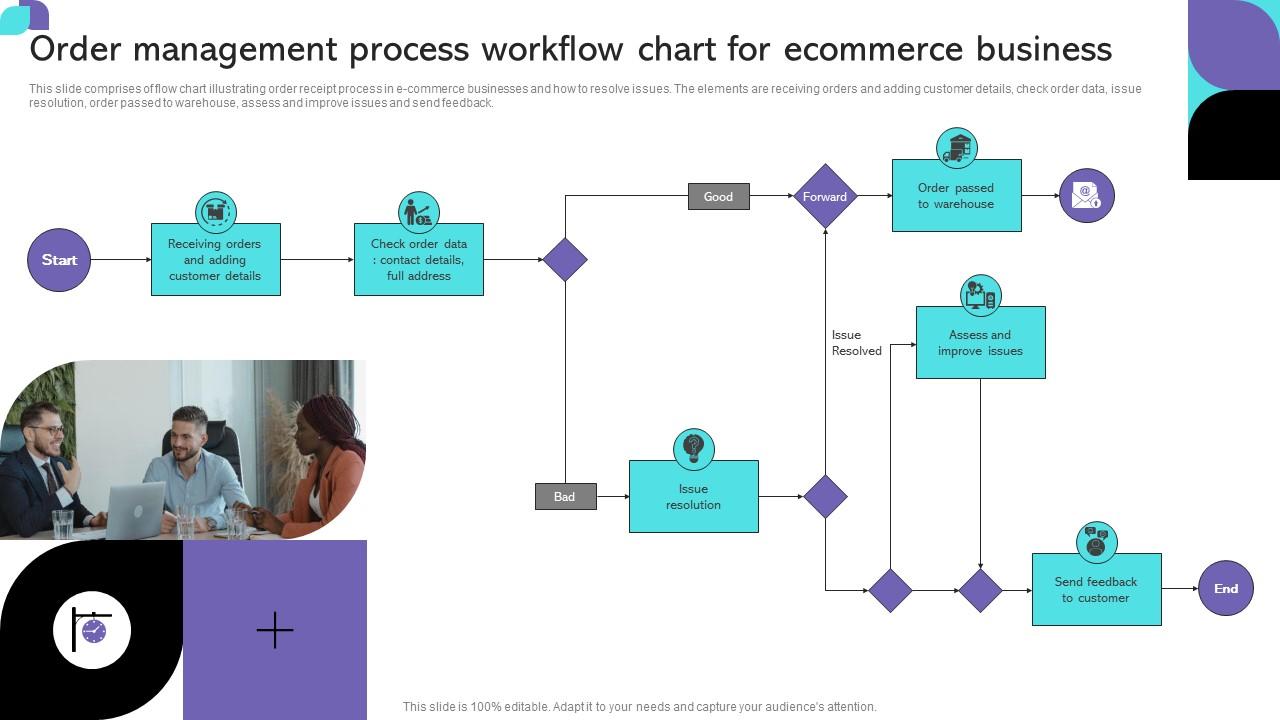
Automation covers many parts of your online business. Here’s how you can automate the most important areas:
Marketing takes a lot of time if you do it manually—writing emails, posting on social media, or following up with customers. Marketing automation makes this process easy and effective.
Automated Email Campaigns: Send welcome emails, abandoned cart reminders, product recommendations, or sale announcements automatically.
Example: If a customer signs up but doesn’t buy, they get a special offer after three days—without you lifting a finger.
Personalization: Use customer data to send personalized offers, boosting your chances of sales.
Example: If a customer likes shoes, they get emails about new shoe arrivals, not handbags.
Social Media Posting: Schedule posts and ads on Facebook, Instagram, or WhatsApp in advance.
Example: Plan your whole month’s promotions in one afternoon. The system posts them at the right time.
Customer Segmentation: Divide your customers into groups based on their interests or buying habits, and target them with special offers.
Example: Loyal customers get a discount on their birthday.
For example, if someone leaves your site without buying, an automated email can remind them about their cart. Studies show that abandoned cart emails recover up to 10% of lost sales.
Drip Campaigns: Send a series of timed emails to guide new customers towards purchase.
A/B Testing: Automatically test which subject lines or offers get better results, then focus on what works.
Cross-Sell/Upsell: After a purchase, automatically recommend related products.
Reactivation: If a customer hasn’t bought in 3 months, send them a special “We miss you” offer.
Sending too many emails can annoy customers. Set limits and let customers choose their preferences.
Not updating your customer list—make sure it’s clean and up-to-date for best results.
Order processing is at the heart of your business. Automating this process means:
Instant Order Confirmation: Customers get a confirmation email the moment they place an order.
Example: No more waiting for manual replies. Customers feel secure because they know their order is received.
Automatic Stock Updates: Inventory levels adjust in real time, so you never oversell.
Example: If you have 5 items and sell 1, your stock instantly shows 4 everywhere—on your site, Facebook, and marketplaces.
Order Routing: Orders go directly to the right warehouse or supplier, speeding up delivery.
Example: If you have warehouses in Dhaka and Chittagong, orders go to the nearest one without manual sorting.
Fraud Detection: Automated checks can spot suspicious orders and flag them before shipping.
Example: If an order is unusually large or the address doesn’t match the card, the system warns you.
This smooth process keeps customers happy and helps you avoid costly mistakes.
Partial Fulfillment: If part of an order is out of stock, the system can ship available items and notify the customer automatically.
Order Tagging: Tag orders as “VIP” or “Express” for special handling.
Returns Processing: Automate return labels and refunds for faster customer support.
Shipping can be complicated, especially when dealing with many orders. Automation helps by:
Auto-Generating Shipping Labels: Create and print labels instantly after an order is paid.
Example: No more handwriting addresses, which can cause errors.
Real-Time Tracking: Send tracking information to customers automatically.
Example: Customers receive SMS or email updates on where their package is.
Shipping Rate Calculations: Calculate the best shipping options and prices for each order.
Example: Choose the cheapest or fastest courier based on the customer’s location.
Integration with Couriers: Connect directly to local delivery companies, so orders are picked up and delivered fast.
Example: In Bangladesh, integrate with Pathao, Paperfly, or Sundarban Courier for smooth delivery.
In Bangladesh, where delivery speed and reliability matter, automation ensures your orders reach customers on time.
Bulk Label Printing: Print 100+ labels with one click during big sales.
Automatic COD Settlement: For cash-on-delivery (COD), automate the settlement process with couriers.
Delivery Confirmation: Automation marks orders as “Delivered” once confirmation comes from the courier.
Always check courier integrations for bugs—one small error can delay hundreds of orders.
Monitor failed deliveries and automate re-try or customer notifications.
Manual accounting is slow and easy to get wrong. Automation tools make it simple:
Automatic Invoice Generation: Create and send invoices as soon as an order is placed.
Example: Customers get their invoice instantly, and your records are always accurate.
Expense Tracking: Record expenses like shipping, packaging, and marketing automatically.
Example: Every time you pay for shipping, the cost is logged in your system.
Sales Reports: Generate daily, weekly, or monthly reports with a click.
Example: Know your profit and loss without hours of Excel work.
Tax Calculations: Calculate and apply taxes based on location and product type.
Example: GST/VAT is applied correctly, helping you stay compliant.
Automated accounting helps you stay on top of your finances without hiring an accountant.
Bank Integration: Sync your sales and expenses directly with your bank account.
Multi-Currency Support: Sell in different currencies and automate currency conversion.
Automated Reconciliation: Match bank deposits with sales automatically.
Check settings for local tax rules—wrong tax rates can cause legal issues.
Back up your financial data regularly.
If you want to automate your online business in Bangladesh, here are practical tips and insights you might not find elsewhere:
Start Small, Scale Fast: You don’t need to automate everything at once. Start with the most time-consuming tasks, like order processing or inventory updates. As your business grows, add more automation.
Example: Start with order confirmation and inventory sync. Add shipping label generation and automated emails later.
Choose the Right Tools: Not all automation tools are the same. Pick ones that integrate well with your e-commerce platform (Shopify, WooCommerce, etc.) And local payment/shipping providers.
Example: If you use bKash and Pathao, check that your automation tool supports both.
Test Before Full Rollout: Always test automation with a few orders to ensure everything works as expected. Fix issues before scaling up.
Example: Process five test orders and check every step—from order to delivery.
Monitor and Improve: Automation is not “set and forget.” Check reports regularly, look for errors, and update workflows as your business changes.
Example: If you notice failed deliveries are increasing, review your courier integration.
Train Your Team: Make sure your staff knows how automation works, so they can solve issues quickly.
Example: Hold a training session whenever you add new automation features.
Workflow Integration: Automation is most powerful when different tools “talk” to each other. For example, connecting your marketing, order, and shipping systems creates a seamless experience for both you and your customers.
Example: An order triggers a shipping label, sends tracking info, and adds the customer to a VIP email list—all at once.
Without integration, you’ll still have manual work between systems.
Data Quality: Automated tools rely on the data you provide. If your product listings, stock levels, or customer information are not accurate, automation can create bigger problems. Double-check your data before automating.
Example: If your product weight is wrong, shipping costs and labels will be incorrect.
Regularly audit your data for mistakes.
Automation for Compliance: Bangladesh has unique regulations for online sales, taxes, and invoicing. Automation can be set up to handle local requirements, but you must update it if laws change.
Customer Feedback Loops: Automated “How did we do?” emails after delivery give you valuable feedback without extra effort.
As your online store in Bangladesh grows, workflow automation becomes even more important. Here’s how you can create a scalable, automated business:
With multiple sales channels (your website, Facebook, Amazon, Walmart), managing stock can be a headache. Use an automated inventory management tool that:
Updates stock in real time across all channels
Example: Sell one item on Amazon, and your Facebook stock goes down, too.
Alerts you when items are low or out of stock
Example: Get an SMS or email when it’s time to reorder.
Prevents overselling and disappointed customers
Example: No more “Sorry, we’re out of stock” emails.
Use barcode scanning to speed up stock updates and reduce errors.
Track inventory by batch or lot number for better quality control.
Customers expect fast answers. With automation, you can:
Use chatbots to answer common questions 24/7
Example: “Where’s my order?” answered instantly by bot.
Send automated replies for order status, returns, and delivery queries
Example: Customers get return instructions without waiting for a human.
Route complex issues to your support team
Example: If the bot can’t help, the question goes to your team, with all customer details included.
Set up automated satisfaction surveys after every support case.
Use AI to suggest answers or solutions based on past cases.
Marketing campaigns often need custom landing pages. Automated tools like those from Bizmation allow you to create landing pages in one click—no coding needed. This speeds up your marketing and helps you test new offers faster.
Example: Launch a flash sale with a dedicated page in minutes.
Track results automatically—see which pages convert best.
Use templates to keep design consistent and professional.
Link landing pages to email and ad campaigns for better results.
Online fraud is a real risk. Automated systems can:
Detect suspicious patterns (large orders, mismatched addresses)
Block or flag risky transactions
Save you from financial losses and chargebacks
Update your fraud rules regularly as scammers change tactics.
Use automation to limit orders from risky locations or IP addresses.
Growth decisions depend on good data. Automated reports show you:
Best-selling products
Profitable customer segments
Trends in returns or cancellations
This helps you make smarter business choices, not just guesses.
Set up daily, weekly, or real-time dashboards.
Export reports for your accountant or investors with one click.
Big marketplaces like Amazon and Walmart rely heavily on automation. Sellers who use automation tools can:
Update listings across multiple platforms with one click
Process hundreds of orders daily without extra staff
Automatically manage price changes, promotions, and stock
For example, many successful Amazon sellers in Bangladesh use inventory sync tools, automated repricers, and auto-responders for customer messages. This lets them compete with large sellers globally.
Walmart, too, offers automation options for order management, shipping, and returns. If you want to expand beyond Bangladesh, mastering these tools is essential for growth.
Here’s a comparison of key automation features between Amazon, Walmart, and local Bangladeshi platforms:
|
Platform |
Automated Inventory Sync |
Automated Order Processing |
Automated Shipping Integration |
Automated Customer Support |
|---|---|---|---|---|
|
Amazon |
Yes |
Yes |
Yes |
Partial (via bots) |
|
Walmart |
Yes |
Yes |
Yes |
Partial (via bots) |
|
Local Bangladeshi Platforms |
Sometimes (depends on provider) |
Limited |
Limited |
No |
Automation is not a “nice to have”—it’s necessary to succeed on global marketplaces.
Invest in tools and training before you scale up internationally.
A Bangladeshi clothing brand started selling on Amazon and Walmart. With automation, they synced 5,000 products to both sites, processed 300 orders/day, and handled customer queries with a 2-person team. Without automation, they would have needed 10 extra staff.
There are many automation tools out there, but not all are created equal—especially for Bangladeshi businesses. Here’s what to look for:
Local Integration: Does the tool work with your local payment gateways (bKash, Nagad, Rocket) and couriers (Paperfly, Pathao)?
Ease of Use: Is the interface simple? Can your team learn it quickly?
Support and Training: Is customer support responsive? Do they offer training materials?
Cost: Does it fit your budget, especially as you grow?
Security: Does it protect your customer and payment data?
Scalability: Can the tool handle 10x more orders as you grow?
Customization: Does it let you set up workflows that match your unique business?
Mobile Access: Can you check orders or reports from your phone?
Let’s compare a few popular automation agencies and tools for Bangladeshi e-commerce:
|
Provider |
Inventory Management |
Order Automation |
Shipping Integration |
Accounting Automation |
Local Payment Support |
|---|---|---|---|---|---|
|
Bizmation |
Advanced |
Yes |
Yes |
Yes |
Yes |
|
Shopify Apps |
Good |
Yes |
Via plugins |
Partial |
Limited |
|
WooCommerce Plugins |
Customizable |
Yes |
Via plugins |
Partial |
Limited |
Always check for hidden costs. Some tools charge extra for each marketplace or courier integration.
Ask about data migration—can you easily switch tools if your business needs change?
Bizmation (bizmation.io) is one of Bangladesh’s leading e-commerce automation agencies. They understand the unique needs of local businesses and offer smart, practical solutions.
Inventory Management: Keep your stock synced across all sales channels, prevent overselling, and get restock alerts.
Fraud Order Filtering: Advanced systems catch risky orders before they hurt your business.
One-Click Landing Pages: Launch marketing campaigns quickly with ready-made, customizable pages.
Order Processing Automation: Orders are confirmed, picked, packed, and shipped with minimal manual work.
Shipping Integration: Connect with local and international couriers for fast, reliable delivery.
Accounting Automation: Generate invoices, track expenses, and get easy-to-read sales reports.
Customer Support Automation: Use chatbots and automated replies to keep customers happy.
Many Bangladeshi brands are already growing faster by letting Bizmation handle their automation. With their help, even small teams can manage large numbers of orders and customers with ease.
Local Customization: Bizmation adapts automation workflows to suit Bangladeshi payment methods, language preferences, and courier partnerships.
Example: Automated SMS notifications in Bangla for better customer engagement.
Scalable Solutions: Whether you’re a startup or a large enterprise, their tools grow with your business.
Example: Add more features as you expand, without changing your entire system.
Real-Time Analytics: See your business performance instantly, so you can make decisions with confidence.
Example: Daily dashboards show your best-selling products and most profitable channels.
Bizmation offers “hands-on” support. If you get stuck, their team helps you fix problems, not just sell software.
They keep up with Bangladesh’s changing e-commerce rules, updating your automation as needed.
To learn more about e-commerce automation best practices, you can also visit Wikipedia's Marketing Automation page.
Ready to move forward? Here’s a clear path to get started with automation:
Review Your Workflow: List out all the tasks you do daily—order processing, stock updates, customer emails, etc.
Identify Pain Points: Which tasks take the most time or cause the most errors? These are your top priorities for automation.
Choose Automation Tools: Pick tools or agencies (like Bizmation) that match your needs, budget, and platforms.
Integrate and Test: Set up the automation and run test orders. Check for any errors or missing steps.
Train Your Team: Make sure everyone knows how the new system works.
Monitor and Adjust: Use automated reports to track performance and fix any issues quickly.
Suppose you want to automate order processing and shipping:
Write down your current process. Where do mistakes happen? Where do you waste time?
Choose a tool that connects your website, inventory, and local courier.
Set up the tool and process a test order from start to finish.
Fix any problems (wrong address format, missing stock update, etc. ).
Teach your team how to handle exceptions (like failed payments).
Review results weekly and improve over time.
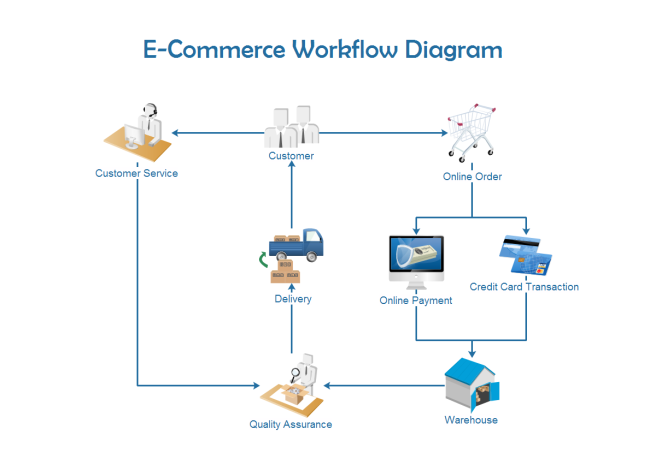
Here’s how a fully automated order workflow might look for a Bangladeshi e-commerce business:
Customer places an order on your website.
Automation tool updates inventory and sends order confirmation.
System generates an invoice and records the sale in your accounts.
Shipping label is created and sent to your courier.
Customer receives tracking information automatically.
If any issues arise (e.g., payment fails, address mismatch), the system flags the order for review.
This process reduces manual work, speeds up delivery, and keeps customers informed at every step.
Add automated fraud checks before shipping.
Trigger marketing emails after delivery to encourage reviews or repeat sales.
If the courier fails to deliver, the system can automatically reschedule or refund.
Compete Globally: With automation, you can sell on platforms like Amazon and Walmart, reaching customers worldwide.
Example: Sync prices and stock in real time, even with international orders.
Handle More Orders: Even with a small team, you can process hundreds of orders per day.
Example: One person can manage what used to need five.
Gain Customer Trust: Fast, accurate service builds your reputation and brings repeat buyers.
Example: Customers get what they expect, when they expect it.
Lower Costs: By reducing manual labor and mistakes, you keep your costs low and profits high.
Example: Fewer errors mean fewer refunds and returns.
Better Data Security: Automated systems often have built-in security, protecting your business and customer information.
Example: Data is encrypted and backed up automatically.
Flexible Work Hours: With automation, your business runs even if you’re not online.
Easier Expansion: Open new channels or launch new products quickly.
Here’s a quick comparison of how manual and automated operations differ:
|
Task |
Manual Process |
Automated Process |
Time Saved |
Error Reduction |
|---|---|---|---|---|
|
Order Processing |
Hand-written logs, manual email updates |
Automatic confirmation, stock update |
Up to 80% |
High |
|
Inventory Updates |
Manual count and entry |
Real-time sync across channels |
Up to 90% |
Very High |
|
Shipping |
Manual label creation, tracking emails |
Auto-generated labels, tracking sent |
Up to 70% |
High |
|
Accounting |
Manual invoice, spreadsheet entry |
Auto-invoicing, digital reports |
Up to 95% |
Very High |
If you spend 20 hours a week on manual tasks, automation can save you 15-18 hours. That’s time you can use to grow your business or enjoy life.
Trying to Automate Everything at Once: Start with key pain points. Too much change at once can create confusion.
Begin with order processing and shipping. Add marketing and accounting later.
Ignoring Data Quality: Automation is only as good as the data you provide. Keep your product info and customer records clean.
Check for typos, wrong prices, or missing images before launching automation.
Not Training Your Team: Make sure everyone knows how to use the new systems.
Hold regular training and Q&A sessions.
Forgetting to Monitor: Check your automation regularly to catch any errors or changes in workflow.
Review dashboards daily, especially after updates.
Choosing the Wrong Tool: Pick solutions that fit your business size, sales channels, and local needs.
Ask for a demo before you commit.
Over-automation: Some tasks need human touch—like handling angry customers. Don’t automate everything.
Ignoring Legal Requirements: Make sure your automation is set up for local tax and data privacy laws.
Scaling up means handling more products, orders, and customers—without more stress. Here’s how automation helps:
Multi-Channel Selling: Sync your inventory and orders across your website, Facebook, Amazon, and Walmart.
Prevents overselling and keeps data consistent everywhere.
Automated Promotions: Schedule sales, discounts, and product launches in advance.
Run flash sales at midnight without staying up late.
Smart Analytics: Use data to find your best products and most valuable customers.
Focus your marketing on what works.
Flexible Workflows: Adjust automation as your business grows, adding new tools or features as needed.
Example: Add more warehouses or couriers with a few clicks.
APIs and Integrations: As you grow, APIs (tools that let systems “talk” to each other) become more important. Choose automation solutions that offer strong integration options.
APIs allow you to connect new marketplaces or apps easily.
Custom Workflows: Every business is different. Don’t be afraid to customize your automation to match your exact needs—this is where agencies like Bizmation really shine.
Example: Custom order routing rules for different regions or product types.
Don’t rely on “one-size-fits-all” tools as you grow. Review your needs every few months.
Monitor automation performance—what worked for 100 orders may break with 10,000.
E-commerce automation uses software to handle repetitive business tasks like order processing, inventory updates, and marketing. It is important because it saves time, reduces mistakes, and lets you grow your online store without hiring a big team.
Yes! Even small online businesses benefit from automation. Tools and agencies like Bizmation offer solutions for all business sizes, helping you manage orders, stock, and customers with less manual work.
Automation tools can send emails, schedule social media posts, create personalized offers, and segment your customers—automatically. This means your marketing is more targeted and effective, and you save many hours each week.
Yes, it is possible. Automation tools help you manage listings, process orders, and update inventory across Amazon and Walmart, even from Bangladesh. This makes it easier to sell internationally and compete with big sellers.
Bizmation offers local expertise, smart automation tools, and support tailored to Bangladeshi businesses. They handle everything from inventory management to fraud detection and landing page creation, letting you focus on growing your business.
No. Automation is best for repetitive tasks. You still need humans for creativity, solving complex problems, and building relationships with customers.
Costs vary. Some tools charge monthly fees, others take a percentage of sales. Start small and add features as you grow.
---
If you want to stay ahead in Bangladesh’s fast-growing online market, automation is your best friend. Save time, cut errors, and grow your profits with smarter, faster workflows. Don’t let manual tasks hold your business back. Automate your e-commerce with Bizmation for smarter growth, and watch your business reach new heights!

