E-commerce has changed the way people in Bangladesh do business. Today, anyone with an internet connection and a good product can open an online store and reach buyers from Dhaka to Chittagong and beyond. But as your online shop grows, managing everything by hand becomes harder. There are more orders, more customers, and more marketing to handle. This is where ecommerce automation comes in. If you want to save time, reduce mistakes, and make more money, automating your ecommerce store could be your smartest move.
Automation is no longer just for big companies with large budgets. Even small businesses and solo entrepreneurs in Bangladesh can use simple tools to run their online shops more efficiently. With automation, you can eliminate the stress of forgotten orders, missed emails, or data entry errors.
You can also respond to customers faster, deliver products more quickly, and focus on building your brand instead of handling repetitive tasks.
This guide will show you exactly what ecommerce automation is, why it matters for you, and how to use it to grow your online business in Bangladesh. Whether you sell clothes, electronics, food, or handmade crafts, this article explains everything you need to know—including real-world examples, practical steps, and common mistakes to avoid.
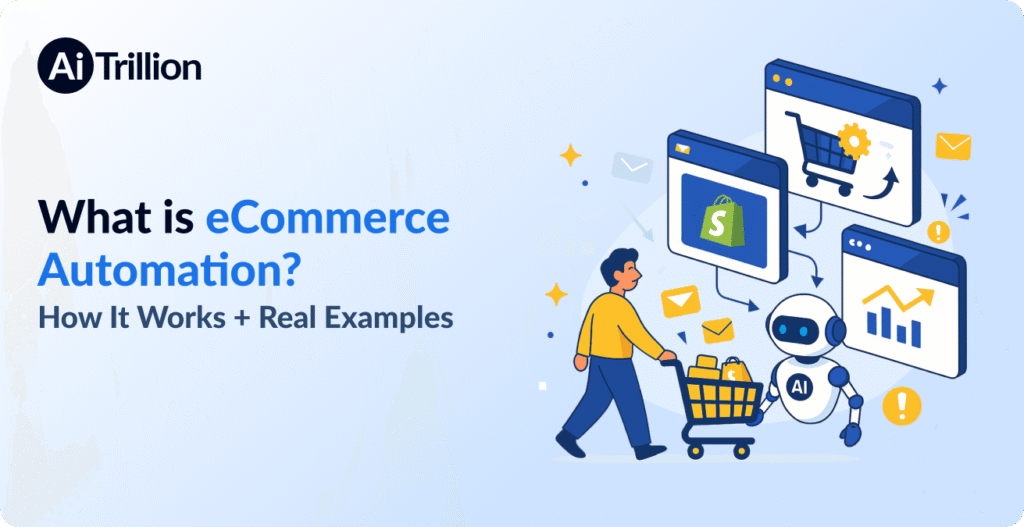
E-commerce automation means using software and tools to complete tasks in your online business automatically, without needing you to do each step yourself. Imagine your store running like a well-oiled machine, handling orders, marketing, shipping, and even accounting—all while you focus on growing your business.
For example, when a customer places an order, the system can:
Send a confirmation email
Update your inventory
Create a shipping label
Add the sale to your accounting records
All of this can happen without you touching a single button. This is the power of automation.
But ecommerce automation goes beyond just order management. It can cover almost every area of your business, from customer service to social media posts. When used correctly, automation acts like an invisible team working for you 24/7. Instead of being awake at midnight to confirm orders or reply to questions, your system does it instantly.
Another key point is that automation is not just about doing things faster—it’s about doing them better. For example, an automated email never forgets to say “thank you” to a new customer, and an automated inventory tracker never sells out-of-stock items.
If you are serious about building a reliable, scalable business, automation is essential.
Let’s look at some common ecommerce tasks you can automate:
Order processing: From order confirmation to shipping, every step can be automated.
Customer emails: Send receipts, tracking info, and marketing messages automatically.
Inventory management: Track products, update stock, and get alerts for low inventory.
Social media posts: Schedule promotions and new product announcements in advance.
Accounting: Sync sales and expenses with your accounting system.
Customer support: Use chatbots to answer simple questions instantly.
The main idea is to let technology handle the repetitive work, so you can focus on strategy, product development, and customer relationships.
In the past, only large companies could afford automation because the software was expensive and complicated. Now, with platforms like Shopify, WooCommerce, and various plugins, even small Bangladeshi businesses can access powerful automation tools for a low monthly fee. This has leveled the playing field, allowing anyone to compete with bigger brands.
Running a successful online store in Bangladesh is not easy. You must handle multiple tasks every day—promoting your products, responding to customers, packing orders, and keeping records. Small mistakes can lead to lost sales, unhappy buyers, or delayed deliveries.
Automated ecommerce solves these problems by:
Saving time: Free yourself from repetitive tasks so you can focus on what matters.
Reducing errors: Automation follows rules, so it rarely makes mistakes like humans do.
Increasing profits: When your store runs smoothly and customers are happy, your sales grow faster.
Bangladeshi entrepreneurs can use automation to scale their ecommerce business—even if they have a small team or limited resources.
Bangladesh’s ecommerce market is growing fast. With more people shopping online, especially after the COVID-19 pandemic, competition is higher than ever. Shoppers expect fast service, accurate orders, and quick responses to questions. If you do everything manually, it’s easy to fall behind.
Many Bangladeshi business owners still rely on paper records, manual phone calls to couriers, and spreadsheets for tracking sales. This works for a few orders per day, but becomes impossible as you grow. Automation lets you handle growth without stress.
Manual work in ecommerce often means:
Spending hours updating spreadsheets
Forgetting to send order confirmations
Losing track of inventory, leading to overselling or stockouts
Making mistakes in shipping addresses
Taking too long to reply to customers
Each of these can damage your business. For example, a missed delivery can lead to a bad review, which hurts your reputation. Automation reduces these risks and helps you build a trustworthy brand.
Suppose two similar online clothing stores start in Dhaka. Both sell sarees and kurtis. Store A uses manual processes, while Store B invests in basic automation:
Store A processes 10 orders a day, but often misses emails and sometimes sells out-of-stock items.
Store B handles 50 orders a day, sends instant emails, and never oversells.
After six months, Store B has happier customers, better reviews, and more repeat buyers—all because of automation.
Many Bangladeshi entrepreneurs spend all their time “in” their business (packing orders, replying to messages) and never “on” their business (finding new products, marketing, building partnerships). Automation frees you to step back, analyze your results, and plan for the future.
Faster scaling with a small team: Even if you have just one helper, automation can make your business look and act like a much larger company. You can process more orders without hiring more staff, keeping your costs low.
Consistency builds trust: Automated messages and processes ensure every customer has the same positive experience. People are more likely to recommend your store if they always get prompt replies and accurate deliveries.
Let’s look at the main parts of your online business that can be automated for maximum results.
Marketing can take a lot of time, especially if you try to do everything by hand. Ecommerce marketing automation lets you set up campaigns that run automatically based on customer behavior. Here’s how it works:
Welcome Emails: When someone signs up or buys for the first time, an email welcomes them and may offer a discount.
Abandoned Cart Reminders: If a customer leaves items in their cart but doesn’t check out, the system sends a reminder email.
Birthday Offers: Customers receive special discounts on their birthdays without you needing to remember.
Product Recommendations: Software suggests products to customers based on their shopping history.
These automated messages help you sell more without writing new emails every day.
Re-engagement campaigns: If a customer hasn’t bought anything for three months, the system sends a “We miss you!” email with a special offer.
Review requests: After an order is delivered, an email asks the customer for feedback or a review. This boosts your store’s reputation.
VIP programs: Automatically track loyal customers and send them exclusive offers after a certain number of purchases.
Good automation tools allow you to segment customers (group them by interests or behavior) and send targeted offers.
For example, you can send different emails to people who bought baby clothes vs. electronics.
You can set up A/B testing to see which email subject lines or offers work best, without manual effort.
The system automatically sends two versions of an email to different groups and picks the winner.
Suppose you run an online shoe store. You notice many visitors add shoes to their cart but don’t finish buying. With automation, you set up a rule: If someone abandons their cart, they get a reminder email after 1 hour, a second reminder the next day, and a discount code if they still haven’t bought after 3 days. Many customers will return and complete their purchase, increasing your sales without extra work.
Sending too many emails: Automation should help, not annoy. Test your emails and watch for unsubscribes.
Forgetting personalization: Use customer names and suggest products based on their history for better results.
Order processing is the heart of any online shop. With ecommerce order automation, you can:
Automatically send order confirmations to customers
Notify your warehouse or supplier to start packing
Update stock levels in real-time
Alert you if an item is out of stock
This reduces the chance of errors, such as selling items you don’t have or forgetting to ship an order.
Order splitting: If a customer orders multiple items, and some are in different warehouses, the system can split the order and send requests to each location.
Priority shipping: Automatically move urgent or high-value orders to the top of the packing list.
Return processing: When a customer requests a return, the system can send instructions and a shipping label, updating stock when the return arrives.
Order automation can connect with your supplier for dropshipping, so you don’t have to keep stock yourself.
When an order comes in, the supplier gets notified and ships directly to the customer.
Some tools can prioritize urgent orders (like express shipping) so they are processed first.
This helps you keep promises for “same-day delivery” or “VIP” customers.
Imagine you sell electronics and offer cash-on-delivery. With automation, the system confirms the order, notifies your courier partner, and marks the order as “ready for delivery. ” If the customer cancels before shipping, the system updates everything automatically, so you don’t waste time or money.
Not syncing inventory in real-time: If you sell on Facebook and your website, make sure both update instantly to avoid overselling.
Ignoring order exceptions: Sometimes, payment fails or an address is wrong—set up alerts so you can handle these cases quickly.
Shipping is often the most complex part for Bangladeshi businesses, especially with local courier services and international buyers. Shipping automation can:
Print shipping labels with one click
Send tracking numbers to customers automatically
Choose the best courier based on price and speed
Calculate shipping costs for each order
This means you don’t need to copy-paste addresses or manually create delivery slips.
Bulk label printing: For busy days, print 50 labels at once instead of one by one.
Automatic courier assignment: If you use multiple couriers, the system can choose the best option based on delivery area or price.
Shipping rule customization: Set rules like “use Sundarban Courier for Dhaka orders, Pathao for Chittagong.”
Automation can notify the customer if there’s a delay or if their package is delivered.
This reduces “Where is my order?” messages and builds trust.
You can offer multiple shipping options (standard, express, pickup) automatically at checkout.
The system calculates prices and estimated delivery dates in real time.
Let’s say you ship 30 packages a day across Bangladesh. With shipping automation, you upload all orders, print labels, and send tracking numbers in 10 minutes, instead of spending hours writing addresses by hand. Customers know exactly when to expect their package, and you get fewer complaints.
Not updating tracking info: Always send tracking numbers so customers don’t keep calling or messaging for updates.
Using only one courier: Compare rates and speeds—automation makes it easy to switch and save money.
Keeping your books in order is crucial for any business. Accounting automation in ecommerce helps you:
Record every sale, refund, and expense automatically
Generate sales and tax reports in seconds
Sync your store with accounting software like Xero or QuickBooks
This reduces human errors and saves hours every month—especially important during tax season.
Daily sales summary: Get a daily or weekly email with your sales, refunds, and expenses.
VAT/GST calculation: The system calculates taxes automatically for each order, based on location and product type.
Expense tracking: Connect your bank account to track all business expenses in one place.
Automation can help you spot fraud by flagging unusual transactions.
For example, multiple orders from the same IP address, or very large orders from new customers.
You can schedule profit and loss statements to be sent to your email every week or month.
This helps you see problems early and adjust your strategy.
Suppose you sell on Daraz, Facebook, and your own website. Instead of entering all sales manually, you connect each platform to your accounting software. At the end of the month, you export one report for your accountant—saving days of work and avoiding mistakes.
Forgetting to reconcile bank statements: Automation helps, but always double-check your bank statements for missing payments or double charges.
Not tracking expenses: Record all business expenses (courier fees, packaging, ads) to see your real profit.
Let’s explore how automation actually works in Bangladeshi ecommerce businesses.
A Dhaka-based fashion store uses an ecommerce platform that connects directly to their warehouse. When a customer orders a kurti, the system:
Sends an email confirmation
Deducts the item from inventory
Prints a shipping label for the delivery staff
Marks the order as “shipped” when picked up
All these steps happen in less than a minute, without the owner’s help.
This store used to have two people just for order processing. After switching to automation, one person can now handle five times as many orders. Mistakes and late deliveries have almost disappeared. During the Eid shopping season, automation helped them ship 500 orders in three days—something that would be impossible by hand.
A Chittagong electronics shop sets up an email sequence:
After a purchase, the customer gets a thank you email.
Two weeks later, the system sends a discount offer for accessories related to their first purchase.
If the customer does not buy, a final reminder email is sent.
The store owner reports a 20% increase in repeat purchases from this simple automation.
Before automation, the shop owner manually emailed customers but often forgot. With automation, every buyer receives the right message at the right time. The system also tracks who opens emails or clicks links, helping the owner see what works. Over time, they adjusted their offers and increased sales even more.
A baby products shop uses a tool that compares rates from Sundarban Courier and Pathao. When an order is received:
The system picks the cheapest courier based on the customer’s location.
It prints the label and sends a tracking number to the buyer.
The owner doesn’t need to call or check prices—they just pack and ship.
This automation saved the owner 2–3 hours every day. They used to check courier websites and call for rates, which was slow and sometimes led to overpaying. Now, the system always chooses the fastest or cheapest option, based on rules set by the owner.
Customers are happier with faster, cheaper delivery, and the owner saves money.
A home decor store exports all sales data to accounting software at the end of each week. The software:
Records revenue and expenses
Calculates VAT
Generates a monthly summary
At tax time, the owner simply prints the report—saving days of manual work.
This store used to spend a full week every year preparing for taxes. Now, everything is ready with one click. Automation also helps them see which products are most profitable, which months are busiest, and where they can cut costs.
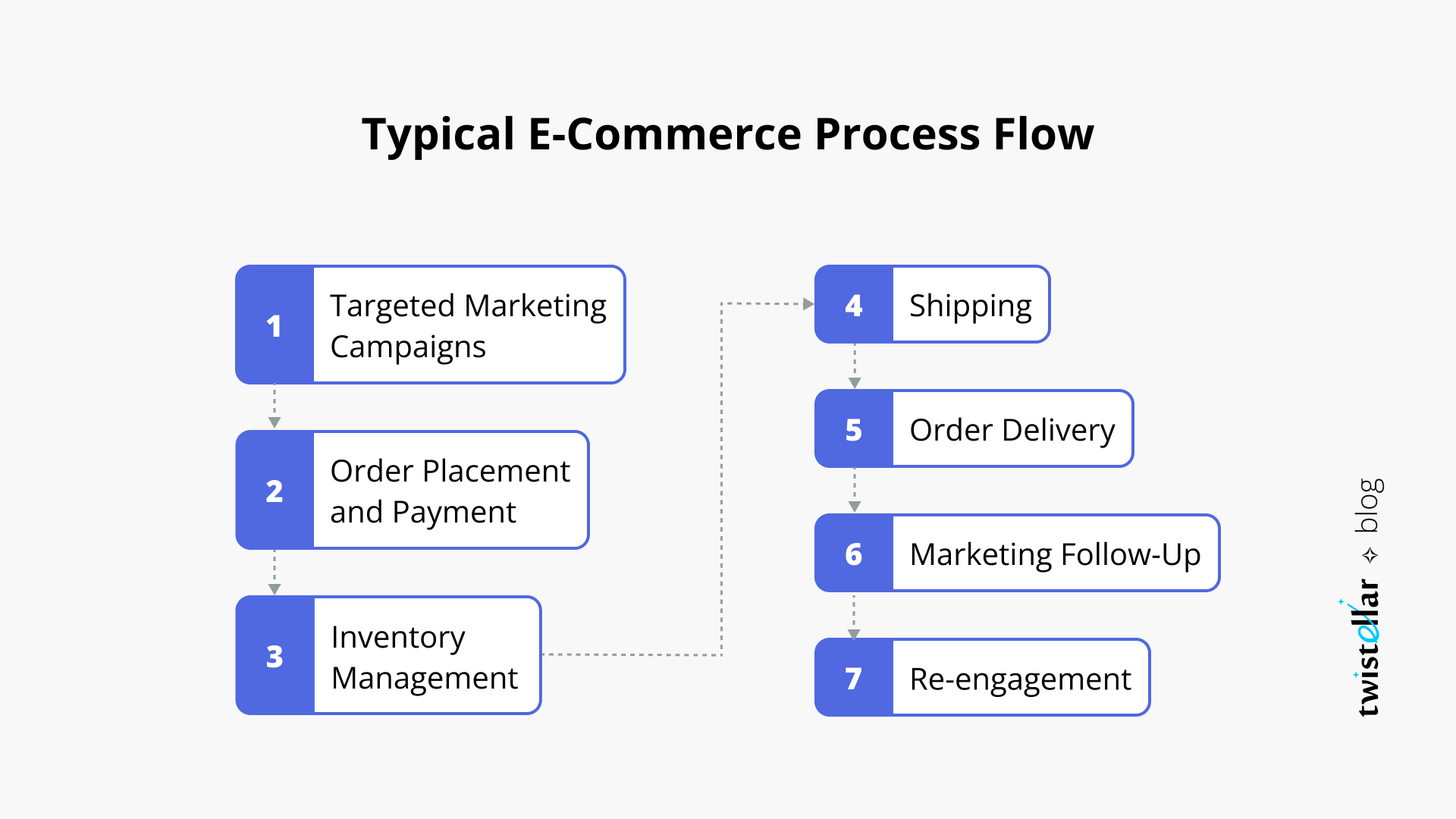
Every online business has a workflow—the steps from receiving an order to delivering it and getting paid. Automation makes each step smoother:
Order to fulfillment: No need to copy addresses or manually update stock.
Marketing to sales: Emails and offers go out at the right time, every time.
Shipping to delivery: Labels and tracking are automatic.
Sales to accounting: Every transaction is recorded without typing.
The result is fewer mistakes, faster delivery, and happier customers. You can handle more orders without hiring a big team.
Here’s a simple view of how manual and automated workflows differ:
|
Step |
Manual Workflow |
Automated Workflow |
|---|---|---|
|
Order Received |
Check email, write down order |
Order appears in dashboard automatically |
|
Inventory Update |
Subtract item in notebook or spreadsheet |
Stock level updates instantly |
|
Shipping |
Manually write label, call courier |
Label printed and courier booked with one click |
|
Accounting |
Add sale to ledger at end of week |
Sale recorded in accounting software instantly |
Order status updates: Customers receive automatic updates at each stage—order received, shipped, out for delivery, delivered.
Returns and refunds: If a return is requested, automation can generate a return shipping label and process the refund as soon as the item arrives.
Customer feedback: After delivery, an email asks for feedback or a review, improving your reputation.
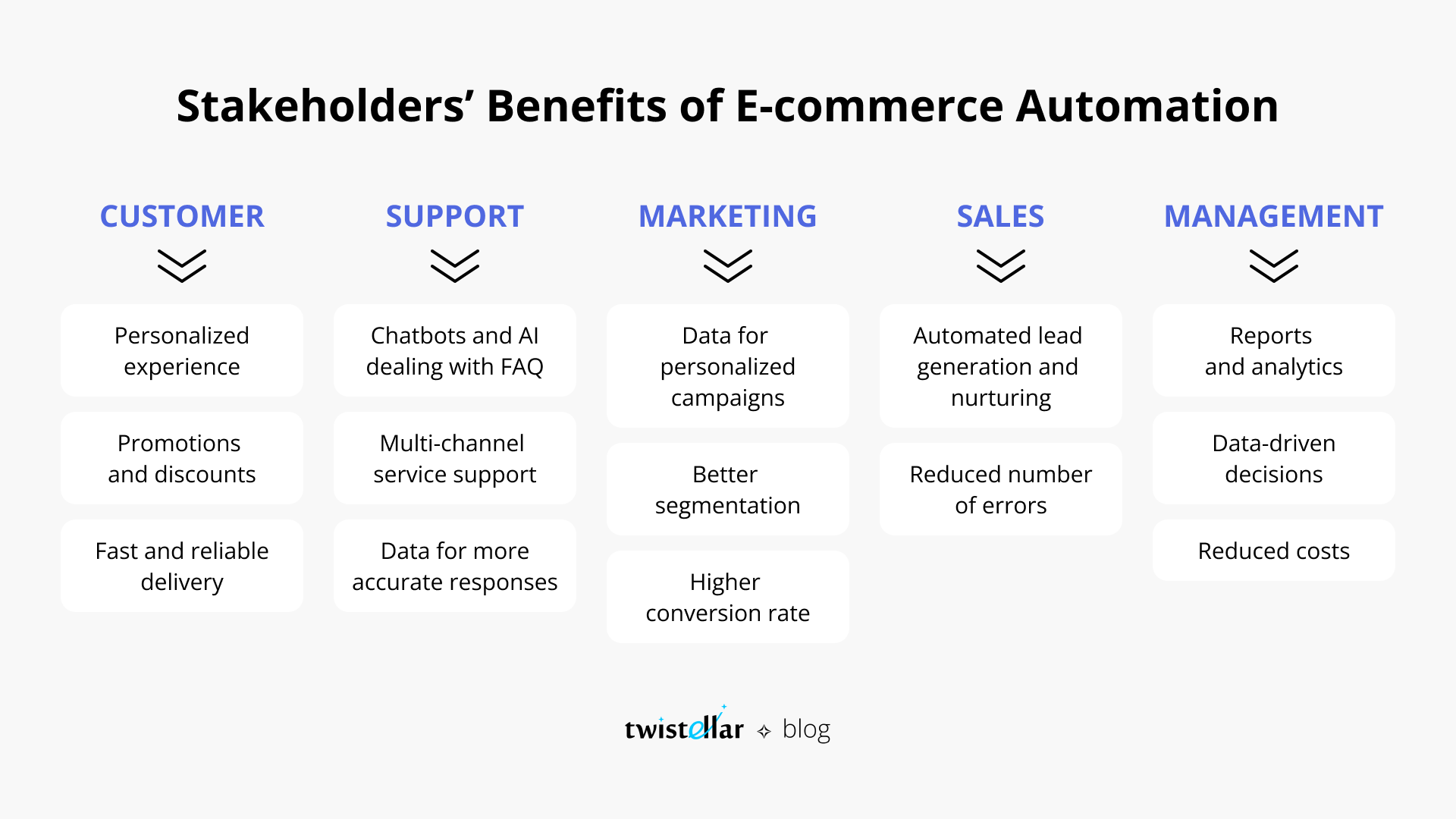
Less burnout: Business owners and staff feel less stress and can focus on high-value work.
Data-driven decisions: Automated reports make it easy to see what’s working and what needs improvement.
Big names like Amazon and Walmart have set the standard for ecommerce automation. These platforms use advanced systems to:
Send order confirmations and shipping updates instantly
Suggest products to buyers based on their browsing
Adjust prices and stock levels in real time
If you sell on Amazon or Walmart, you can use tools to automate order processing, inventory syncing, and even customer service replies. This is often called Amazon automation or Walmart automation e commerce. It lets you manage a large online store with minimal hands-on work.
Bangladeshi sellers can learn from these giants. Local platforms like Daraz also offer automation features, and third-party tools can connect your shop to these marketplaces for seamless operation.
Shopify: Offers built-in automation for order management, inventory, and marketing. Apps like Oberlo (for dropshipping) and Klaviyo (for email) make automation easy.
WooCommerce: With plugins, you can automate almost everything—stock updates, shipping, emails, and even SMS notifications.
Magento: Suits larger stores with complex needs. Allows advanced automation, but may require more setup.
Daraz: Lets you automate order processing, inventory management, and shipping through their seller center.
Evaly, AjkerDeal: Support some automation for order and inventory tracking, but you may need third-party tools for full automation.
If you sell on multiple platforms (your website, Facebook, marketplaces), use tools like Zapier or Integromat to connect them. For example, when an order comes in from Facebook, it updates inventory on your website and accounting software instantly.
Using too many tools: Start simple. Too many tools can cause confusion and errors.
Not checking compatibility: Ensure your chosen automation tools work with your ecommerce platform and local payment or shipping partners.
Getting started with automation in your online store can be easy if you follow these steps:
Map your current workflow. Write down every step from order to delivery.
Identify repetitive tasks. Look for things you do every day—sending emails, updating stock, printing labels.
Choose the right tools. Popular ecommerce platforms like Shopify, WooCommerce, and Magento have built-in automation features.
Integrate marketing automation. Use email marketing tools (like Mailchimp or Klaviyo) to send messages based on customer actions.
Connect shipping and accounting software. Tools like ShipStation and QuickBooks can automate shipping and bookkeeping.
Test your automations. Before going live, run test orders to make sure everything works smoothly.
Train your team. Make sure everyone knows how to use the new systems.
Start small: Automate one process at a time. For example, begin with order confirmation emails, then add inventory syncing.
Monitor results: Track how much time you save and any reduction in errors.
Adjust as you grow: Your needs will change as your business expands. Review your automations every few months.
Suppose you sell sarees online. Here’s how you can automate:
When a customer orders, the system sends a thank you email, updates inventory, and prints a courier label.
If a product is low in stock, you get an alert to reorder.
All sales are recorded in your accounting app, and you receive a weekly report by email.
In just a few clicks, you save hours every week and avoid costly mistakes.
SMS notifications: Send automatic SMS updates to customers for order status, which is popular in Bangladesh.
Social media integration: Use automation to post product updates or promotions on Facebook and Instagram without manual effort.
Skipping testing: Always test your automations with real or dummy orders before going live.
Not updating old processes: Replace manual steps—don’t run old and new systems together, or you’ll get confused.
Automation is not just for saving time—it’s key to scaling your business. Here’s why:
Handle more orders: With automation, you can process 10 or 100 orders a day without extra staff.
Expand to new markets: Sell on multiple platforms (your website, Facebook, Amazon) with inventory syncing.
Improve customer experience: Fast shipping, instant replies, and personalized offers keep buyers coming back.
A truly automated ecommerce store has:
Inventory management: Tracks stock, alerts when items are low, and reorders automatically.
Fraud detection: Flags suspicious orders before they are shipped.
One-click landing pages: Quickly create new sales pages for promotions or new products.
Automated marketing: Sends emails, runs ads, and posts on social media with little effort.
Automated customer service: Chatbots answer common questions day and night.
Multi-channel sales: Sync inventory and orders across your website, Facebook Shop, and marketplaces like Daraz.
Dynamic pricing: Adjust prices automatically based on competitor pricing or demand.
Customer segmentation: Group buyers by purchase history, location, or spending habits for targeted marketing.
Loyalty programs: Automate rewards for repeat customers to boost retention.
Easier business handover: If you ever sell your business or hire new managers, automated systems make the transition smooth and reduce training time.
Data backup and security: Automation tools often include backup and security features, reducing the risk of data loss or fraud.
Automating too soon: If your process is not clear, automation can make mistakes worse.
Choosing the wrong tools: Not every software fits every business. Test before you commit.
Not training staff: Automation is only useful if your team knows how to use it.
Ignoring customer service: Some messages need a human touch—don’t automate everything.
Forgetting to update automations: As your business grows, your automations need to change too.
Overcomplicating systems: Start simple and add more automation as you become comfortable.
Neglecting customer feedback: Always allow customers to reply or ask questions if they need help—don’t hide behind automation.
Failing to monitor automations: Check regularly to ensure everything works as planned. Sometimes software updates or changes can break automations.
Document your processes: Write down your automations and update instructions as you change them.
Ask for support: Most automation tools offer help guides or customer support—use them if you get stuck.
Here is a quick comparison of essential automation features for online stores:
|
Feature |
Manual Process |
Automated Solution |
Benefit |
|---|---|---|---|
|
Order Confirmation |
Send email for each order |
Instant email sent automatically |
Saves time, faster response |
|
Inventory Sync |
Check and update stock daily |
Real-time stock updates |
Avoid overselling |
|
Shipping Label |
Manually write/call courier |
Labels printed in one click |
Reduces errors, faster shipping |
|
Accounting Export |
Enter data into spreadsheet weekly |
Data synced instantly |
Accurate records, less work |
|
Abandoned Cart Emails |
Check for abandoned carts manually, send emails |
Emails sent automatically at set intervals |
Recovers lost sales |
|
Customer Segmentation |
Manually group customers by history |
Software creates groups based on behavior |
More targeted marketing |
|
Returns Processing |
Handle each request by hand |
System sends instructions and labels automatically |
Faster, less confusing returns |
Bizmation (bizmation.io) is a leading ecommerce automation agency serving Bangladeshi businesses. They offer smart solutions to help you build a fully automated ecommerce store, including:
Inventory management: Track every item in real time, get alerts for low stock, and update across multiple sales channels.
Fraud order filtering: Protect your business by automatically reviewing and blocking suspicious orders.
One-click landing pages: Launch new products or promotions in minutes with ready-made landing pages that convert visitors into buyers.
Local expertise: Bizmation understands the unique challenges in Bangladesh, from local courier integration to payment gateways like bKash.
Custom solutions: Whether you sell fashion, electronics, or groceries, Bizmation tailors automation to your needs.
Friendly support: Get help in Bangla or English whenever you need it.
Thousands of ecommerce owners trust Bizmation to automate their online stores, reduce manual work, and grow faster.
Multi-platform integration: Connect your website, Facebook page, and marketplace stores for real-time inventory and order sync.
Local courier solutions: Integrates with Pathao, Sundarban, Paperfly, and others for fast, reliable shipping automation.
Payment gateway automation: Supports bKash, Nagad, Rocket, and card payments, ensuring smooth transactions.
Data analytics: Get easy-to-read reports on sales, top products, and customer trends.
One Bizmation client, a children’s clothing store in Chattogram, went from 15 orders a week to 200 orders a week after automating with Bizmation. Their team stayed the same size, but their revenue grew by 400% in one year. Automation handled order confirmation, delivery, returns, and even WhatsApp notifications for customers—all set up by Bizmation.
To learn more about global trends in ecommerce automation, you can check resources such as Wikipedia’s E-commerce overview.
If you want to save time, avoid errors, and boost your profits, automating your online store is the next step. Bizmation makes it easy:
Schedule a free consultation: Visit bizmation.io and book a call.
Discuss your needs: Share your current process and goals.
Get a tailored plan: Bizmation will suggest the right automation tools and set them up for you.
Grow smarter: Focus on your products and customers while Bizmation handles the rest.
Prepare your data: Make sure your product details and customer lists are accurate before automating.
Set clear goals: Decide what you want to achieve—faster shipping, fewer errors, more repeat customers.
Be ready to learn: New tools can take a little time to master, but support is always available.
Ecommerce automation uses software and tools to perform routine tasks in your online store automatically. It helps you process orders, send marketing emails, manage inventory, and keep accounts—saving you time and reducing mistakes.
Automation can cover many areas, from sending order confirmations and shipping updates to restocking inventory and updating your accounts. The goal is to remove manual, repetitive work so you can focus on growing your business.
Automation means faster order processing, fewer errors, and happier customers. You spend less time on manual work and more time growing your sales. Happy customers are more likely to buy again and recommend your store.
Recover lost sales: Automated reminders bring back customers who forget to finish their purchase.
Reduce costly mistakes: Fewer errors mean fewer refunds and complaints.
Increase repeat business: Automated loyalty programs and follow-up emails keep customers coming back.
Start with the most repetitive and time-consuming tasks. These often include order confirmations, inventory updates, shipping label creation, and basic marketing emails. As your business grows, you can automate more advanced processes.
If you get many questions, consider a chatbot for common answers.
If you sell on multiple platforms, automate inventory syncing first to avoid overselling.
Yes. Bizmation’s solutions are designed for both small and large businesses in Bangladesh. Whether you’re just starting out or handling hundreds of orders, Bizmation can automate your key processes and help you grow.
Bizmation offers flexible packages, so you don’t pay for features you don’t need. They can help you start with basic automation and add more as your business grows.
Plan your workflow before you automate. Choose tools that fit your needs, test them carefully, and update your automations as your business changes. Train your team so everyone understands the new systems.
Always back up your data before making big changes.
Ask other business owners for recommendations and feedback on automation tools.
---
If you want to run your ecommerce store smarter, faster, and with fewer headaches, now is the time to automate. Let Bizmation help you build a future-ready, fully automated online business—so you can focus on what you love while your store works for you.
Visit bizmation. io today and take the first step towards smarter growth.

